
Agent Teams
Agent teams let you coordinate multiple AI agent sessions working together. One session acts as the team lead, spawning teammates, assigning tasks, and synthesizing results. Teammates work independently, each in its own context window, and communicate directly with each other through a shared messaging system.
Unlike subagents, which run within a single session and can only report back to the main agent, teammates are fully independent sessions that can discover tasks, claim work, and message each other without going through the lead.
Origin
This feature is inspired by Anthropic’s agent teams for Claude Code. Anthropic introduced the concept of coordinating multiple Claude Code sessions as a team — a lead that spawns teammates, a shared task list, and inter-agent messaging.
We took that concept and built it as an editor-agnostic MCP layer. Instead of being locked to a single tool, Repo Hub’s agent teams work across every editor we support: Kiro, Cursor, Claude Code, and OpenCode. The coordination happens through shared JSON files on disk and two MCP servers, so any editor that speaks MCP can participate.
Subagents vs Agent Teams
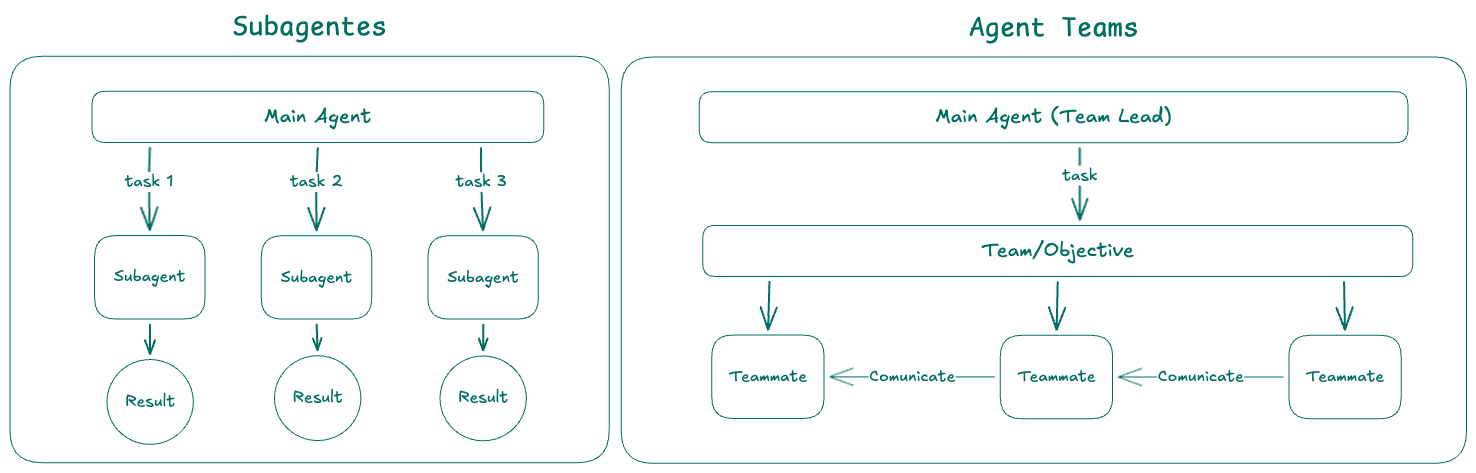
| Subagents | Agent Teams | |
|---|---|---|
| Context | Own context window; results return to the caller | Own context window; fully independent |
| Communication | Report results back to the main agent only | Teammates message each other directly |
| Coordination | Main agent manages all work | Shared task list with self-coordination |
| Best for | Focused tasks where only the result matters | Complex work requiring discussion and collaboration |
| Token cost | Lower: results summarized back to main context | Higher: each teammate is a separate session |
Use subagents when you need quick, focused workers that report back. Use agent teams when teammates need to share findings, challenge each other, and coordinate on their own.
When to Use Agent Teams
Agent teams are most effective for tasks where parallel exploration adds real value:
- Research and review: multiple teammates investigate different aspects simultaneously, then share and challenge each other’s findings
- New modules or features: teammates each own a separate piece without stepping on each other
- Debugging with competing hypotheses: teammates test different theories in parallel and converge faster
- Cross-layer coordination: changes that span frontend, backend, and tests, each owned by a different teammate
Agent teams add coordination overhead and use significantly more tokens than a single session. For sequential tasks, same-file edits, or work with many dependencies, a single session or subagents are more effective.
Architecture
An agent team consists of two MCP servers that coordinate through shared JSON files on disk:
| Component | Role |
|---|---|
| agent-teams-lead | MCP used by the team lead to spawn teams, create tasks, send messages, and monitor |
| agent-teams-teammate | MCP injected into each teammate session for claiming tasks, messaging, and publishing artifacts |
| Shared Task List | tasks.json — teammates claim and complete tasks with file-level locking |
| Mailbox | messages.json — inter-agent messaging (direct, broadcast, or to lead) |
| Artifacts | artifacts.json — outputs published by teammates linked to tasks |
All state lives in .agent-teams/ at the workspace root. A team.log file captures all teammate activity for auditability.
Editor-agnostic by design
Anthropic’s implementation is tightly coupled to Claude Code — it uses Claude Code’s process model, tmux/iTerm2 for split panes, and Claude Code’s internal messaging.
Repo Hub’s implementation is built entirely on MCP, which means it works with any editor that supports MCP servers. The lead MCP spawns teammates as CLI processes (e.g., kiro-cli, claude, opencode), and coordination happens through shared files that any process can read and write. When you run hub generate, the agent automatically receives team lead instructions — no manual prompt editing needed.
Setup
Add the agent-teams-lead MCP to your hub.yaml:
mcps:
  - name: agent-teams-lead
    package: "@arvoretech/agent-teams-lead-mcp"
Run hub generate to regenerate your editor config. The agent will automatically receive instructions on how to use agent teams when the MCP is detected.
Each teammate gets the agent-teams-teammate MCP injected automatically when spawned — no manual configuration needed.
Lead Tools
The team lead has access to these tools via the agent-teams-lead MCP:
| Tool | Description |
|---|---|
spawn_team | Create a team with an objective and list of teammates (each referencing a role/agent file) |
create_task | Add a task to the shared list with optional dependencies and exclusive file paths |
add_teammate | Add a new teammate to an active team |
remove_teammate | Remove a teammate and stop their process |
team_status | Check team progress, task states, and unread messages |
send_message | Send a message to a specific teammate or broadcast to all |
wait_for_team | Block until all tasks are resolved or all teammates finish |
read_artifact | Read an output published by a teammate |
Teammate Tools
Each teammate session has access to these tools via the agent-teams-teammate MCP:
| Tool | Description |
|---|---|
whoami | Get identity, role, team objective, and list of other teammates |
list_tasks | List available tasks, optionally filtered by status |
claim_task | Claim a pending task (with dependency and lock validation) |
update_task | Update status or add notes to an owned task |
complete_task | Mark a task as completed with a summary and touched paths |
send_message | Message another teammate or the lead |
fetch_messages | Check for messages (with unread filter) |
ack_messages | Mark messages as read |
write_artifact | Publish an artifact (markdown, JSON, or code) linked to a task |
read_artifact | Read an artifact by ID |
Task Coordination
Tasks support dependencies and exclusive file paths to prevent conflicts:
spawn_team({
  objective: "Implement user profile feature",
  teammates: [
    { agent: "worker.md" },
    { agent: "worker.md" },
    { agent: "reviewer.md" }
  ]
})

create_task({
  title: "Backend API endpoints",
  description: "Create CRUD endpoints for user profiles",
  exclusive_paths: ["src/api/profiles/"],
  acceptance_criteria: ["GET /profiles/:id returns profile data"]
})

create_task({
  title: "Frontend profile page",
  description: "Build the profile editing UI",
  exclusive_paths: ["src/pages/profile/"],
  acceptance_criteria: ["Profile form renders and submits"]
})

create_task({
  title: "Integration tests",
  description: "Test the full profile flow end-to-end",
  depends_on: ["<backend-task-id>", "<frontend-task-id>"],
  acceptance_criteria: ["E2E test passes for profile CRUD"]
})
Task claiming uses file locking (mkdir-based atomic locks) to prevent race conditions when multiple teammates try to claim the same task simultaneously.
Messaging
Teammates communicate through a shared mailbox. Messages have a kind field for categorization:
info— general updatesquestion— asking for inputanswer— responding to a questionblocker— reporting a blocking issuedecision— recording a decision
The lead can broadcast to all teammates or message individuals. Teammates can message each other directly or send to the lead.
Best Practices
- Create tasks immediately after spawning — teammates start looking for tasks right away and will retry a few times, but don’t make them wait too long
- Use
exclusive_pathsto prevent file conflicts between teammates working in parallel - Use
depends_onto chain tasks that must run in order (e.g., QA after implementation) - Keep 2-3 tasks per teammate for good throughput without excessive context switching
- Send a broadcast message after creating tasks to notify teammates of available work
- Always call
wait_for_teamafter creating tasks to monitor completion - Start with 3 teammates for most workflows — more teammates means more coordination overhead
- Avoid same-file edits — break work so each teammate owns different files
Limitations
- One team at a time per workspace
- Teammates cannot spawn their own teams (no nesting)
- The lead session is fixed for the team’s lifetime
- Teammates run as CLI processes with
--no-interactive— they can’t ask the user questions - Task status can lag if a teammate exits without marking tasks complete
- Token usage scales linearly with the number of active teammates