
Your orchestrator can now act as a team lead, spawning multiple AI teammates that work in parallel on different tasks and communicate with each other directly.
Inspired by Anthropic, built for every editor
Anthropic introduced agent teams in Claude Code — a powerful concept where one AI session coordinates multiple others, each working independently with their own context window, sharing a task list and messaging each other directly.
We loved the idea. But it was locked to a single tool.
With v0.13.0, we took that concept and built it as an editor-agnostic MCP layer. Repo Hub’s agent teams work across Kiro, Cursor, Claude Code, and OpenCode. The coordination happens through shared JSON files on disk and two MCP servers (agent-teams-lead and agent-teams-teammate), so any editor that speaks MCP can participate. Your orchestrator becomes a team lead without changing editors.
How it works
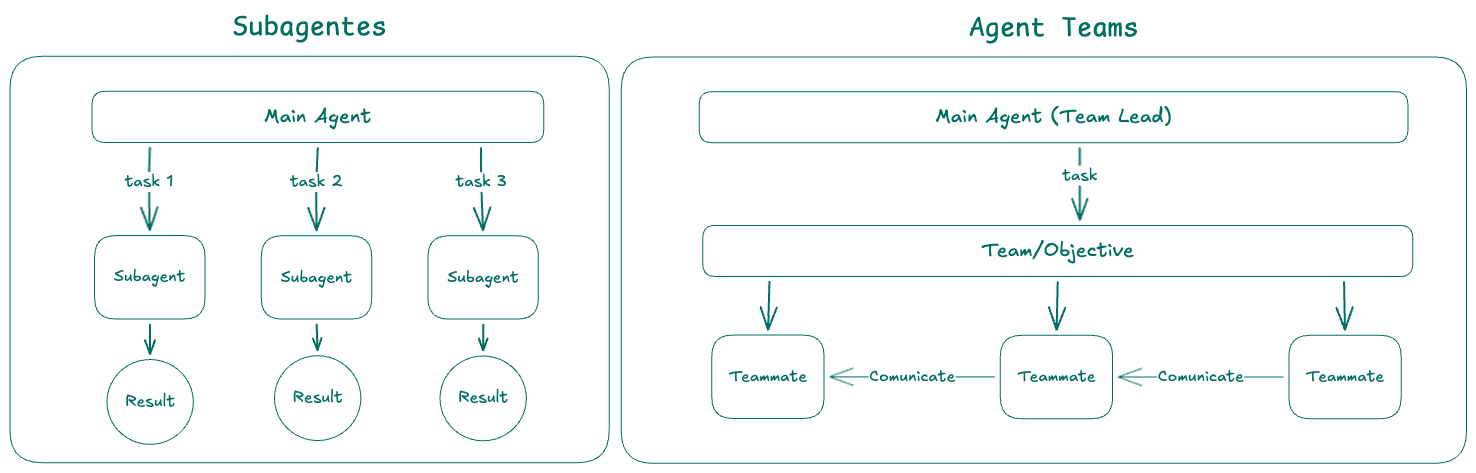
- The orchestrator uses
spawn_teamto create a team with an objective and list of teammates - Tasks are added to a shared list with
create_task— supports dependencies and exclusive file paths to prevent conflicts - Teammates automatically claim pending tasks, do the work, and mark them complete
- Teammates communicate via
send_message— direct messages, broadcasts, or messages to the lead - The lead monitors progress with
wait_for_teamandteam_status - Teammates publish outputs via
write_artifact, which the lead reads withread_artifact
What makes it different
Anthropic’s agent teams are built into Claude Code’s process model — they use tmux/iTerm2 for split panes, Claude Code’s internal messaging, and are only available inside Claude Code.
Repo Hub’s implementation is built entirely on MCP:
- Editor-agnostic: works with Kiro, Cursor, Claude Code, and OpenCode
- File-based coordination: shared JSON files on disk (
tasks.json,messages.json,artifacts.json) that any process can read and write - Automatic orchestrator instructions:
hub generatedetects theagent-teams-leadMCP and injects team lead instructions into the orchestrator prompt — no manual prompt editing - Atomic task claiming:
mkdir-based file locking prevents race conditions when multiple teammates try to claim the same task - Teammate auto-injection: the
agent-teams-teammateMCP is injected into each spawned session automatically - Audit log: all teammate activity is captured in
.agent-teams/team.log
When to use
Agent teams are most effective when parallel exploration adds real value:
- Research and review: multiple teammates investigate different aspects simultaneously, then share and challenge each other’s findings
- New modules or features: teammates each own a separate piece without stepping on each other
- Debugging with competing hypotheses: teammates test different theories in parallel and converge faster
- Cross-layer coordination: changes that span frontend, backend, and tests, each owned by a different teammate
For sequential tasks, same-file edits, or work with many dependencies, a single session or sub-agents are more effective.
Setup
Add the agent-teams-lead MCP to your hub.yaml:
mcps:
  - name: agent-teams-lead
    package: "@arvoretech/agent-teams-lead-mcp"
Run hub generate — the orchestrator automatically receives team lead instructions when the MCP is detected.
Read the full documentation at Agent Teams.
Upgrade
npx @arvoretech/hub@0.13.0 generate